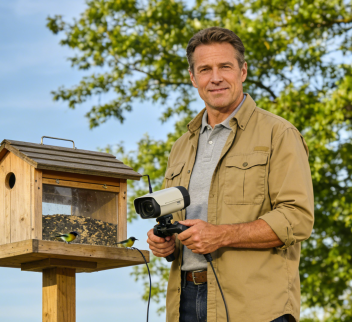
The joy of backyard bird feeding is often ruined by crafty squirrels that raid your seed. A smart bird feeder camera with built-in AI squirrel deterrent technology offers a clever, humane solution. This guide will walk you through setting up, testing, and optimizing this feature on devices like the Smart Bird Feeder Camera with HD Video, helping you reclaim your feeder for the birds.
How the AI Squirrel Deterrent Works
This isn’t a scarecrow. It’s a targeted, intelligent system:
- AI-Powered Identification: The camera uses on-board sensors and algorithms to distinguish between a squirrel and a bird based on size, shape, and movement patterns with over 95% accuracy, preventing false alarms on your feathered friends.
- Humane Deterrent Methods: Upon detection, it triggers a combination of high-frequency ultrasonic sounds (inaudible and harmless to birds and humans but disruptive to squirrels) and a gentle physical vibration. This makes the perch uncomfortable, encouraging the squirrel to leave without harm.
- Integrated Monitoring: Every deterrent event is recorded. You’ll get an instant app notification with HD video evidence, so you can watch the attempted raid and the successful defense in real time.
Step-by-Step Setup: 3 Steps to Activate
1. Optimize Physical Placement
Before enabling the tech, make your feeder a harder target.
- Hang High & Clear: Mount the feeder at least 8 feet (2.5m) off the ground and 5 feet (1.5m) away from any jumping-off point like a tree, fence, or roof.
- Ensure Strong Connection: Confirm the feeder has power (solar or wired) and a stable connection to your 2.4GHz Wi-Fi network for the AI to function.
- Choose Bird-Specific Seed: Use seeds squirrels like less, such as safflower or Nyjer seed, to reduce initial interest.
2. Configure the Deterrent in the App
- Download & Bind: Install the companion app and add your feeder by scanning its QR code.
- Enable the Feature: Navigate to Settings > Deterrent Mode. Toggle on the “Squirrel Deterrent” option. You can usually choose between Ultrasonic Sound, Vibration, or Both.
- Fine-Tune Sensitivity: Adjust the sensitivity setting (Low/Med/High). Start with Medium. Use High for persistent squirrels and Low if birds are being mistakenly targeted.
- Set Trigger Delay: This determines how long a squirrel must be detected before the deterrent activates. A 3-second delay is a good starting point to avoid triggering on passing animals.
3. Secure Installation
- Stability is Key: Whether hanging or pole-mounted, ensure the feeder is secure and doesn’t sway excessively in the wind, as this motion could confuse the sensors.
How to Test & Validate the Deterrent
Don’t just set it and forget it. Verify it works with these tests:
1. The “Mock Squirrel” Test
Use a stuffed animal or a similar-sized object. Slowly move it into the feeder’s detection zone and hold it for longer than your trigger delay. You should receive an app alert and see the deterrent activate in the live feed.
2. The Bird Safety Test
Observe when birds visit. The deterrent should NOT activate. If it does, lower the sensitivity or increase the trigger delay in the app.
3. The Range & Coverage Test
Check the effective distance by triggering the deterrent from different points around the feeder. The typical range is 3-4 feet. Ensure there are no major blind spots blocked by feeder parts or mounting hardware.
4. Long-Term Monitoring
For 48 hours, review the “Activity Log” in your app. Check the video history for any successful squirrel raids or missed detections to see your success rate.
Pro Tips for Maximum Effectiveness
- Add a Baffle: For a physical one-two punch, install a squirrel baffle on the pole or hanging wire above the feeder. The AI deters them from the perch, and the baffle stops them from reaching it.
- Leverage Your Data: Use the app’s activity history to identify peak squirrel hours, then schedule higher deterrent sensitivity for those times.
- Perform Simple Maintenance: Wipe the camera lens and sensors weekly with a soft cloth to keep the AI’s “eyes” clear for accurate detection.
Troubleshooting Common Issues
- Problem: Squirrels aren’t being detected.
- Fix: Increase sensitivity. Ensure the Wi-Fi signal is strong. Clean the camera lens.
- Problem: The deterrent triggers on birds.
- Fix: Decrease sensitivity. Increase the trigger delay to 4-5 seconds.
- Problem: Squirrels keep coming back.
- Fix: Enable “Continuous Deterrent” mode if your app has it. Re-evaluate your feeder’s placement—it may be too easy to access.
Conclusion: Reclaim Your Feeder with Smart Tech
The AI squirrel deterrent on a modern bird feeder camera is a game-changer. It provides a persistent, automated, and humane defense that allows you to enjoy bird watching without constant refills or feeder repairs. By properly setting up, testing, and fine-tuning this feature, you can create a true sanctuary for birds in your backyard.
Explore the smart bird feeder camera with built-in AI squirrel defense.